WORLD electronics offers a complete line of electronic circuit board manufacturing and assembly services, as well as advanced manufacturing services. Our commitment to quality and service is second to no supplier.
Learn MoreOur team of engineers assists you in the development of new designs to optimize quality manufacturability (DFM) and testability, resulting in cost minimization and reduced product development time.
Learn MoreOur flexible manufacturing floor layout and highly trained staff allow for Quick Set-up and Tear Down of small volume prototype runs. This combination grants our customers the benefit of turning new designs quickly and accurately.
Learn MoreWORLD electronics is dedicated to quality. This quality is what underpins our commitment to thorough testing. Our engineers can develop a set of tests that ensure reliability and high performance in all products.
Learn MoreSupply chain management has crossed over from being a narrow management function to being a key operational function.
Learn MoreDigital Signage uses digital screens to present information, promotions, or entertainment in places where people can see it. These displays may show a restaurant menu, a transit update, a welcome message, or a product video. Unlike a printed poster, the content can be changed remotely and scheduled for different times or locations. The screen is only one part of the system. Software, a media player, network access, and reliable content all help it work well.
Small details matter. A menu must remain readable under bright lights, while a station display should make changing departure times easy to spot. The setting, viewing distance, and audience influence what type of display makes sense. Common options include indoor and outdoor signage, interactive touchscreens, video walls, menu boards, and wayfinding displays. Each serves a different purpose, and some systems combine several formats.
The boundaries between types are not always neat. A touchscreen in a shop can also display promotions, while a video wall may provide directions as well as announcements. This guide explains what Digital Signage is, how its main types differ, and where each may be useful. It also considers practical factors such as visibility, content updates, installation, and maintenance. A screen alone is not a strategy. Careful planning helps ensure that messages stay clear, current, and useful to the people who need them.
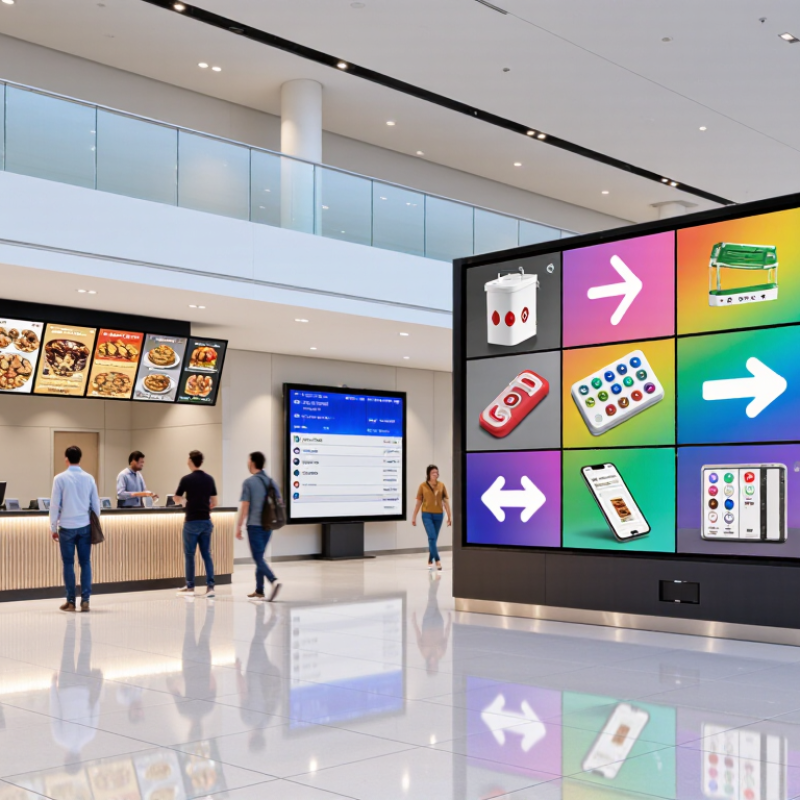
Digital signage is a network of screens whose content can be managed and updated from a central system. A small media player or built-in connection receives schedules, images, video, and live information. Screens may sit in shop windows, clinic lobbies, transit stations, or meeting rooms. The point is not just to display a bright image. It is to show the right message in the right place and at the right time.
Grand View Research estimated the global digital signage market at $26.76 billion in 2023. That figure describes market revenue, not proof that every screen is useful. That distinction matters. Common types include menu boards, wayfinding displays, retail promotions, internal workplace screens, and interactive kiosks. A map outside a hospital lift can answer an immediate question; a menu board can change prices without replacing a printed panel. But poorly timed updates can confuse people.
Networked management makes consistency possible across many locations, while local scheduling allows different messages by screen, time, or audience. The Outdoor Advertising Association of America reported $9.1 billion in U.S. out-of-home advertising revenue for 2023; that broader category includes digital formats, but is not the digital-signage market itself. A screen can still feel empty when its content is stale. Good systems need a clear owner, readable text, dependable connectivity, and regular checks—details that are easy to overlook.
Digital signage is a networked display system: screens show scheduled visual content, while software controls what appears and when. The display may be a bright panel near a shop entrance or a menu screen above a counter. A media player receives content and sends it to the screen. In some setups, playback functions are built into the display.
A content management system (CMS) lets staff upload files, set schedules, and group screens by location. Network links—wired or wireless—carry updates from the CMS to each player. If a connection drops, cached content can keep playing until the link returns. Small details matter. A video that looks crisp on a laptop may appear washed out in strong daylight, or its text may be unreadable from across a lobby. Grand View Research estimated the global digital signage market at USD 25.13 billion in 2022 and forecast USD 35.94 billion by 2030, a projected 4.3% annual growth rate. That is a market forecast, not proof that every installation will pay off. I should admit that a tidy diagram hides messy realities: different screen resolutions, delayed updates, and staff who may not have time to troubleshoot. A reliable system needs clear ownership, tested schedules, and a fallback plan—not just a large display.
Digital signage displays can use landscape or portrait layouts. Full HD contains about 2.1 million pixels, 4K UHD about 8.3 million, and 8K UHD about 33.2 million. Pixel count describes resolution, not the physical size of a display or the quality of its content.
Digital signage uses electronic screens to deliver changing messages in public or commercial spaces. Common types include indoor displays, outdoor boards, video walls, and interactive kiosks. Grand View Research (GVR) valued the global digital signage market at $25.1 billion in 2023. It forecasts an 8.6% compound annual growth rate from 2024 to 2030. That is a forecast, not a promise. Market estimates can vary with definitions, regions, and research methods.
Growth reflects practical uses, not just brighter screens. A shop might update prices remotely, while a transit hub can show arrival times beside service notices. Restaurants, offices, and clinics use displays for menus, wayfinding, or queue information. The right format depends on viewing distance, ambient light, and how often content changes. Screens are not strategy. Poorly timed messages can become visual clutter, and interactive kiosks need clear instructions to be useful. That part is easy to overlook.
Tips: Match screen brightness to the space, test text from a viewer’s usual distance, and assign someone to check content regularly. Review results, too; a display may attract attention without improving understanding.
| Dimension | Data | Description |
|---|---|---|
| Market Snapshot | ||
| Global market size | $25.1 billion (2023) | Market value reported in the supplied title. |
| Forecast period | 2024–2030 | The period covered by the stated growth forecast. |
| Forecast CAGR | 8.6% | Compound annual growth rate reported in the supplied title. |
| Indicative 2030 market value | Approximately $44.8 billion | Calculated by applying an 8.6% CAGR for seven years to the 2023 value; this is a derived estimate, not a separately quoted figure. |
| Digital signage | Networked digital displays used to present content | Content may include information, announcements, directions, promotions, menus, or video. Displays are commonly managed and updated electronically. |
| Common Digital Signage Types | ||
| Indoor signage | Displays installed inside buildings | Used in locations such as shops, offices, schools, healthcare facilities, and public venues for information, communication, and navigation. |
| Outdoor signage | Displays designed for outdoor environments | Typically built to withstand weather and provide visibility in changing ambient light; used for public information, advertising, and transport updates. |
| Interactive signage | Touch-enabled or sensor-enabled displays | Lets users interact with content, such as searching a directory, exploring information, or navigating a self-service interface. |
| Video walls | Multiple displays arranged as one large viewing surface | Used for prominent visual presentations, control-room monitoring, event content, and large-format public information. |
| Digital menu boards | Electronic menus and ordering information | Common in food-service settings; menu items, prices, and availability can be updated digitally. |
| Wayfinding signage | Digital maps, directories, and directional guidance | Helps visitors find destinations in places such as campuses, hospitals, shopping centres, and transport facilities. |
| Transportation signage | Passenger information displays | Can show schedules, service changes, platform or gate information, and other travel updates. |
| Queue and service displays | Queue status, ticket numbers, or service instructions | Used to guide visitors through waiting areas and service points, including public offices and healthcare settings. |
Placement changes what a digital sign must do. Indoor signage serves people already inside a venue: menu boards, queue displays, and wayfinding screens compete with nearby distractions, not weather. A screen beside a lift should show a clear direction within seconds. Indoor installations can use smaller displays, but glare and viewing distance still matter. Context matters.
Outdoor signage faces sunlight, rain, temperature swings, and longer viewing distances. Brightness, sealed enclosures, and readable type are practical requirements, not decorative extras. Transit signage sits between these categories. Stations and vehicles need legible service updates, platform directions, and arrival information, often in crowded, fast-moving spaces. A sign may be indoors yet function like an outdoor display when sunlight hits it.
The market is expanding, though growth alone does not prove a screen will work in a given location. Grand View Research estimated the global digital signage market at $28.83 billion in 2024 and projected $45.94 billion by 2030. Transit has a large potential audience: the American Public Transportation Association reported 7.1 billion U.S. public transit trips in 2023, up 16% from 2022. Those figures describe market scale and ridership, not signage effectiveness. Placement should be tested with real sightlines, ambient light, and passenger flow; an attractive screen can still be easy to miss.
Format-based digital signage is grouped by screen arrangement and how people use it. A video wall joins several panels into one large viewing surface. From across a lobby, it can show maps, event schedules, or moving visuals. Small gaps between panels may remain visible, so alignment and brightness need regular checks. That detail matters.
Menu boards place changing items and prices above counters. Clear type, strong contrast, and sensible grouping help customers read quickly while a line moves. A glare-prone screen can make even large text difficult to see. Kiosks let visitors search, check in, or browse options without waiting for staff. Their placement should leave enough room for wheelchair users and people carrying bags. Touch targets need to be large and responsive. Keep it simple.
Interactive displays invite people to tap, swipe, or explore layered information, often in museums, campuses, and showrooms. They work best when the next action is obvious; a beautiful screen can still confuse someone. Teams can still miss a stale price after a busy update. Regular checks help, and a non-touch route gives visitors another option. Not everyone wants to interact.