WORLD electronics offers a complete line of electronic circuit board manufacturing and assembly services, as well as advanced manufacturing services. Our commitment to quality and service is second to no supplier.
Learn MoreOur team of engineers assists you in the development of new designs to optimize quality manufacturability (DFM) and testability, resulting in cost minimization and reduced product development time.
Learn MoreOur flexible manufacturing floor layout and highly trained staff allow for Quick Set-up and Tear Down of small volume prototype runs. This combination grants our customers the benefit of turning new designs quickly and accurately.
Learn MoreWORLD electronics is dedicated to quality. This quality is what underpins our commitment to thorough testing. Our engineers can develop a set of tests that ensure reliability and high performance in all products.
Learn MoreSupply chain management has crossed over from being a narrow management function to being a key operational function.
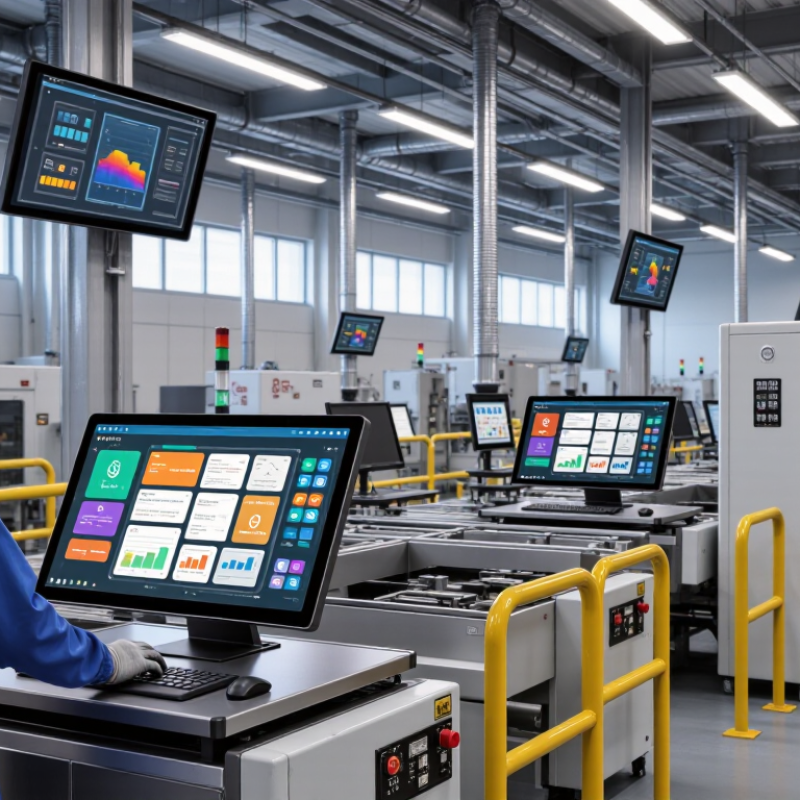
Learn MoreAn Industrial Touch Display is more than a screen mounted in a machine; it is an operator’s daily interface. It brings production data, machine settings, and alarms within reach. On factory floors, that interface may face dust, vibration, changing light, or frequent cleaning. Small details matter. A responsive touch surface can help operators make quick adjustments, while a poorly matched panel can slow routine work. Gloves, viewing angles, mounting depth, and available connections all affect usability. So does long-term product availability.
This overview introduces ten industrial touch display manufacturers with a global presence. It considers practical factors such as display size, touch technology, environmental durability, customization, and technical support. These details can help buyers narrow a crowded field. Still, no manufacturer is the right choice for every site. Requirements differ between a compact control cabinet and a large production-line interface. Published specifications provide a useful starting point, but they cannot reveal every installation challenge. That gap deserves attention. Where possible, compare samples under realistic lighting and with the gloves operators actually wear. Check service arrangements and product lifecycle information, too. A low purchase price may not tell the whole story. Use this guide as a comparison aid, not a substitute for testing requirements with equipment makers and end users. There is no universal winner—only a better fit for a specific application.
An industrial touch display is more than a screen with a touch layer. Its sensor detects contact, and a controller converts that signal into coordinates the machine can use. The sensing method affects accuracy, durability, and how the display behaves in a real workspace.
Projected capacitive panels detect changes in an electric field across a grid of electrodes. They support clear, responsive input, but thick gloves or surface moisture can interfere.
Resistive panels register pressure when two conductive layers meet. They work with gloved hands and simple styluses, though repeated pressing can wear the surface.
Infrared systems detect interruptions in beams running around the display. A raised frame can protect the screen, but dust near the edges may cause false touches. Small details matter.
The controller also filters electrical noise and maps touch coordinates to on-screen controls. Poor grounding or nearby motors can disrupt signals, so installation conditions deserve attention.
A bare-finger demo proves little.
Test with the actual gloves, cleaning routine, and ambient light expected on site. Check response near the screen edges, too. No sensing method is perfect, and the best choice depends on the task. It is easy to underestimate maintenance: even a durable panel needs inspection and occasional recalibration.
When comparing industrial touch display manufacturers worldwide, begin with the environment the screen must survive. Check operating temperature, humidity tolerance, vibration resistance, and ingress protection against your actual installation. A display beside a washdown line needs different protection from one inside a climate-controlled cabinet. Ask how ratings were tested, not just whether they appear in a brochure. A datasheet is not proof.
Touch performance deserves hands-on evaluation. Test the panel with the gloves, moisture, and viewing angles operators will encounter. Compare brightness under factory lighting, then inspect readability from the usual working distance. Confirm that the interface supports your operating system, connectors, and mounting dimensions. Small incompatibilities can delay installation. They do happen.
Assess quality controls through traceability, documented inspection procedures, and clear warranty terms. Ask about expected service life and how replacement parts are handled across regions. A low purchase price may be offset by long lead times or difficult field repairs. Request sample units for temperature cycling and repeated touch testing where practical. Compare total ownership costs, including integration and downtime, rather than unit price alone. No manufacturer can remove every risk; the useful question is how clearly it identifies limits and responds when a product falls short.
A close look at ten leading industrial touch display manufacturers reveals how differently they approach demanding workspaces. Some concentrate on rugged front panels for dusty production lines. Others emphasize sunlight-readable screens for outdoor equipment, or compact displays that fit crowded control cabinets. Their profiles are best compared through practical details: operating temperature, touch response with gloves, screen brightness, ingress protection, and available mounting options. A polished catalogue is useful, but it cannot show how a panel behaves after months beside vibration or heat.
The strongest fit depends on the job, not a ranking alone. Check whether a supplier offers capacitive or resistive touch, and ask how each option performs with moisture, protective films, and repeated use. Confirm interface compatibility and replacement-part availability before choosing. Small details matter. A connector placed awkwardly can make servicing harder. I would also treat impressive durability claims cautiously until test conditions are clear; this is an easy point to overlook.
Tips: Request the exact operating-temperature range and a sample unit for hands-on testing. Try it with the gloves operators actually wear, under the lighting found on site. Compare warranty terms, customization limits, and lead times in writing. Then keep one question open: will the display remain readable and responsive after installation, not just during a short demo?
Representative diagonal sizes found across industrial display product catalogs. Availability varies by model; this chart does not rank or compare manufacturers.
Screen size is measured diagonally in inches. Actual dimensions and aspect ratios vary by product.
Industrial touch display manufacturers typically offer several product families, not one universal screen. Entry-level models may suit operator panels with simple status controls. Higher-specification units often add brighter displays, sealed front bezels, or support for gloves. Panel size, mounting style, and connection options also vary across portfolios. These details shape installation work.
Applications make the differences clearer. On a factory line, a display may show machine alarms beside a vibrating conveyor. A food-processing station may need a smooth, cleanable front surface. Logistics terminals often benefit from responsive touch input and readable screens under changing warehouse light. Medical and transport settings can bring different requirements for cleaning, visibility, and continuous operation. The same display may not fit every environment.
Compare more than screen resolution. Check rated brightness, operating temperature, touch technology, ingress protection, and available mounting options against the actual site conditions. Ask how the unit behaves with wet fingers or work gloves. Test it. Catalog specifications are useful, but they do not fully describe glare, cable access, or operator comfort. That gap matters. I would also treat broad durability claims cautiously unless test conditions are clearly stated; real installations are rarely as tidy as a lab bench.
Choosing an industrial touch-display manufacturer starts with the machine’s actual environment, not a catalog headline. A 15-inch panel on a washdown line faces different risks from one on a factory floor. Check operating temperature, ingress protection, glove response, sunlight readability, and expected touch cycles. Ask for test conditions, not just pass marks. Details matter.
Deloitte’s 2025 Smart Manufacturing Survey found that 92% of surveyed manufacturing executives see smart manufacturing as a primary competitiveness driver over the next three years. That shift makes integration important. Confirm supported interfaces, operating-system compatibility, update policies, and documented product support. A bright screen is not useful if its controller becomes unavailable in year four. Request a pilot unit and test glove response after thermal cycling.
Reliability also depends on the supplier behind the glass. Review warranty exclusions, repair turnaround, spare-part commitments, change-control notices, and traceable quality records. Ask for proof. A tidy datasheet can still hide practical weaknesses, so compare documented results with your own operating conditions. Check whether the supplier can explain how touch accuracy changes with moisture, gloves, or electrical noise. Those small details can decide whether operators trust the display.